


Google is ready to launch Android 16, which will include a set of personalization enhancements and organizational features to enhance productivity in the daily lives of smartphone and tablet users. The next version is much more focused on interface flexibility, smart propositions, and expanded customization – a continuation of the change that Google is making to an adaptive and expressive Android ecosystem.
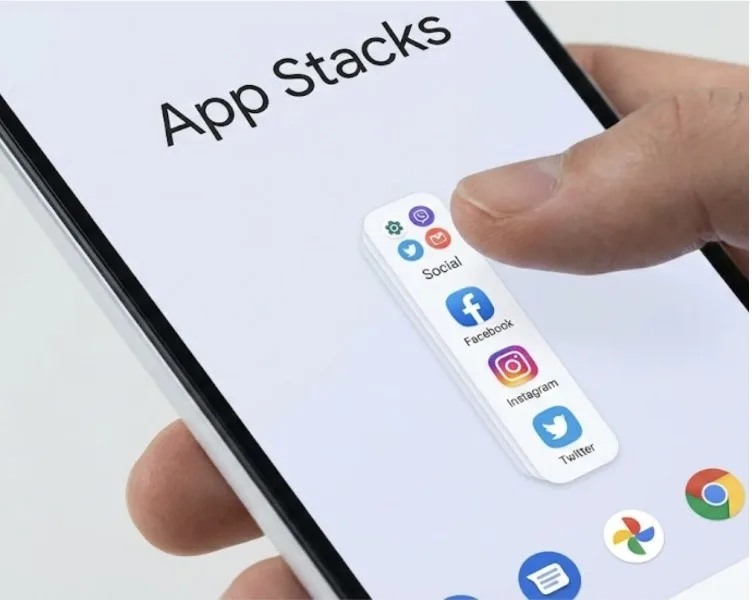
Although the update is currently in developer preview, early functionality rolled out by Google suggests that Google emphasized user control and device personalization.
New Lock-screen Controls and Adaptive Widgets
Android 16 is more configurable in how it sets up a lock screen, allowing users to add numerous options, such as widgets, shortcut tiles, and glanceable information displays. The new design will allow people to add calendar tasks, travel cards, and weather to the lock screen- minimizing the use of apps and providing greater access to key information.
The interface is also time and place-sensitive. Google claims that the system has the ability to automatically render commute-related cards in the morning and meeting reminders on the workday.
Developers have been urged to streamline lock-screen widgets to be responsive layouts in that they are adjustable to the device orientation and area at their disposal.
You may also like read:
- What’s New in the Gemini 3 Nano Banana Pro Release?
- HyperOS 3 for Xiaomi 14 Ultra
- Apple i phone 18 expected in sept
- Removing Night-Mode Portrait on iPhone 17 Series Draws Backlash
Improved Notification Sorting and Smart Bubbles
Another significant redesign has been done on notifications. Android 16 has a smart sorting engine that assigns alerts various levels of urgency and relevance according to on-gadget intelligence. Not as important messages are automatically lessened, whereas reminders and communication-based alerts are more visible.
Google is also increasing notification bubbles. Conversation bubbles can now be run more smoothly through messaging and collaboration applications, enabling users to respond without abandoning the task they are already working on. The latter improvement is highly productive and multitasking-oriented.
Enhanced Scheduling and Calendar Sync
Reminders, to-do lists, and calendar tasks are all integrated in a single streamlined dashboard in the new Schedule Manager. It can even synchronize Google Calendar, Tasks, Keep, and third-party apps, and all these can be experienced via a single interface- a central place to plan the day.
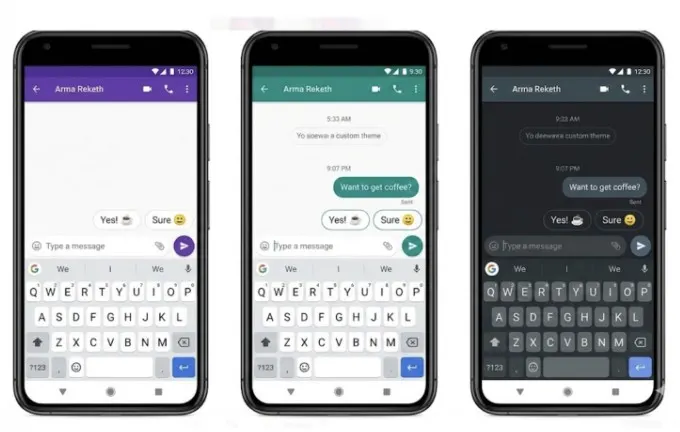
The users can drag objects between lists, add priority flags, and turn reminders into scheduled events with just one gesture. Google attributes this to a larger ambition of turning Android into a friendlier work environment since the aspect of working remotely is still imminent.
Deeper Emoji, Wallpaper, and Avatar Personalization
Android 16 enables more personalisation with new emoji styles, dynamic wallpapers, and customizable avatars. Users are able to create wallpapers with visual themes that are built with AI or transform personal photos into loops of background animation.
Syleming of emojis is updated again- a wide range of color accents and expressive reactions in the keyboard interface is possible. Google is set to ensure that these elements of styling remain consistent in Messages, Gmail, Chat, and social applications that use the new Android design language.
Material You Evolves Further
The design system presented in Android 12, Material You, is being further developed with smoother, easier-to-animate animations and easier control of colors and theming. Android 16 allows users to give different color schemes to lock screens, home screens, and system menus in order to give each phone a more visual identity.
The dynamic theming engine is now automatically adjusted to wallpaper patterns and produces various color combinations, allowing quick theme switching.
Beta Rollout Expected Soon
Android 16 developer releases are already accessible to some devices, and the public beta should also be released in the near future. Google has the habit of releasing significant Android features before releasing a device, so future stable releases can potentially occur at the same time as Pixel hardware later this year.
The OS continues to be refined, and further refinements are anticipated as developers test the OS and give feedback during the preview process.
A More Personal, Organized Android Experience
Android 16 is shaping up to be a smartphone release that is not necessarily only designed to better organize the device, but also enable users to project their identity by designing the phone. This update, as Google has added AI functionality into Android services, is an indicator of the importance of personalization and productivity to the mobile experience in the future.
