


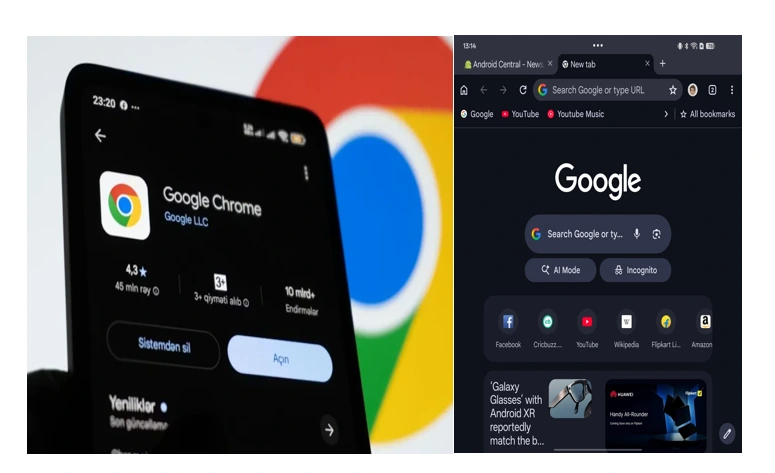
Morning browsing has become a two-hand working process to most of us, with one hand holding a mug of coffee and the other one operating an iPad or any other foldable tablet. To date, that mobile experience never felt much heavier than that of being a desktop, which was as mighty in its power. But by mid-March 2026, Google is closing that gap by a considerable margin.
Finally, with the introduction of the Chrome version 146 Android version of the most popular browser in the world gets an option which has been part of desktop browsing since the dawn of time, a permanent, dedicated bookmarks bar.
It is far more than a simple UI adjustment; it is the paradigm shift of the way we use the web on bigger mobile screens. It is the death of the so-called three-dot dance it is that clicking-tapping of the menu, digging through a list to get to your preferred morning news site or stock dashboard.
Bringing the Palm of your Hand to Desktop DNA
The new bookmarks bar is specifically created to exploit the ample real estate on tablets and book-style foldables. With this on, a smooth horizontal row will automatically be displayed right below the Omnibox (the address bar) and will fill up the length of the screen with the most visited sites.
It is distinctly desktop in design. You have the well-known favicons (website icons) and site names, and, what is, probably the most important, your folders as well. A dropdown menu appears in-line when the folder is tapped, just like it appears on a Windows or Mac computer.
To users with a larger number of bookmarks than horizontal pixels, Google has added a rather ingenious right-facing chevron. This symbol of overflow means that you can scroll through the full length of your bar without the cluttered view. It is a remedy that recognizes the untidy truths of our online existence, in which the frequent websites frequently are in the tens.
Read also: Critical Chrome Security Flaws Threaten Billions of Users Worldwide
The Human Element: Why This is Important Now
Why did it take a feature in 1990s to be available on mobile in 2026? The solution is found in the development of our gadgets. During the early Android times, screen space was one of the most valuable assets that had to be preserved at all costs. However, today, when tablets such as the Pixel Tablet 3 generate 8-inch-plus screen sizes, and foldables such as the Galaxy Z Fold 7 can do the same, the philosophy of a mobile-first hiding everything underneath menu encasing can be seen as a productivity bottleneck.
The way to unlock to the new experience
In case you are holding a tablet or a foldable, then the feature could be already waiting in the offing, but it is disabled by default because it would ruin the classic appearance of some who might still want that.
In order to turn the bar on and regain your browsing speed, all you need to do is the following:
- Make sure that you update your Chrome application to Version 146 through Play Store.
- On the right side of the top, tap the three dots.
- Click on Settings and as far as Appearance.
- Switch off and on the bookmarks bar switch.
Read also: Google Launches New iOS Tool to Help Users
Little Hitch: The Narrow Screen Rule
One group of users will be forced to wait: typical smart phone owners. Google currently classifies the feature as being Hidden on narrow screens. This covers the vast majority of the traditional slab style phones and even the clamshell foldables when in more vertical positions.
The reasoning is good, a bookmarks bar in a 6.1-inch display would most probably consume too much of the vertical area resulting in a minimum content space. But, to the users of external keyboards with their devices, Google has now added a classic Ctrl + Shift + B shortcut to turn the bar on and off, which indicates that further Desktop Mode development can lead to the ability to make even greater customizations to our workspace views.
