


For more than two decades, we have largely deferred to Google when deciding what information is most relevant to us. Their algorithms may be extremely sophisticated, but they don’t read minds. Sometimes you don’t want the “most popular” answer to your question, you want the one from the doctor you know and trust or even just from a source in your own city.
As of early 2026, Google is adding more straightforward methods to “train” your search experience. Well, whether you’re looking to see more from select creators or rather keep low-quality “SEO-farm” websites out of the way, here’s how to force Google into highlighting the results that matter most to you.
Using the “Preferred Sources” Feature (New for 2026)
A few months ago, Google introduced a feature(The list of available publishers) in the U.S. and India (with other locations coming soon) where you can “star” your favorite publications. This is the clearest way to impact “Top Stories” and news-related topics.
How to set it up:
- Look for a Trending Topic: Enter a breaking news event or popular topic such as “Electric Vehicles” or “SpaceX.”
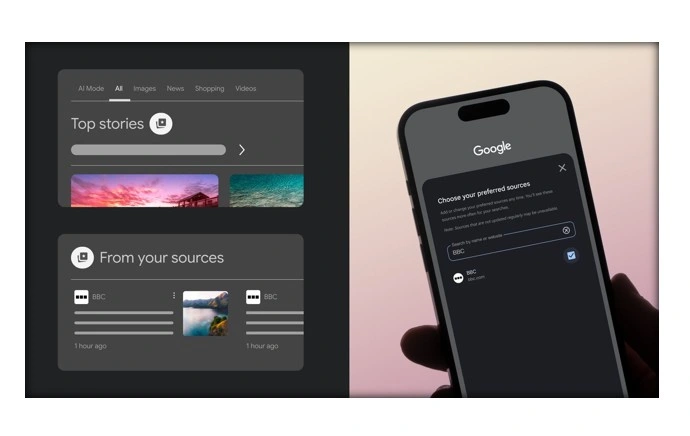
- Find the “Star” Icon: Scan for the “Top Stories” area. When you look to the right of the header, there is a tiny star or card icon.
- Choose Your Favorites: A menu will open where you can search for your favorite publishers. If you click on the checkbox beside a source (for instance, The Verge or Nature), then Google will try to show you articles from your sources in the future.
- The ‘From Your Sources’ section: Once you’ve chosen a few, Google will sometimes create a new “From your sources” section at the top of results pages , if those sites have recently-published content related to what you’re searching for.
Master the “Site:” Operator for Surgery Like Accuracy
For those for whom the automation feels too subtle, you can get manual with Search Operators. This is like “old school” power-user personalization that, to this day, works better than pretty much any AI-driven personalization.
If you only wish to see results from a select list of trusted sites then an AND with the site: can be replaced with OR.
- The Command: [your topic] site:sourceA. com OR site:sourceB. com
- Example: climate change policy site:reuters. com OR site:apnews. com
This informs Google to disregard the entire Web and only provide in return pages from those two domains. It’s the quickest way to penetrate noise when you’re conducting deep research.
Building Your Own Personal Google (Programmable Search)
If you know of a list of 10 or 20 (or less) websites that are better than all the others, like an academic databases collection or lists/hobbyist forums, you should have a Programmable Search Engine (PSE). This is as good as letting you create your own version of Google and indexing sites selectively.
Google Flights travel trick revealed: Save hundreds on airline tickets, easy methods
Building Your Own Custom Engine, Step By Step:
- Go to cse.google.com.
- Click “Add” and give your search engine a name (like, say, “My Tech Pulse).
- Under “Sites to search,” paste in the URLs of your desired sources. You’re able to use wildcards (e. edu/) to include entire domains.
- After creation, Google will offer you a Public URL. Bookmark this link!
- Each header you get on top list when using this link will be of your hand-picked sites.
- Pro Tip: Many users set their browser’s default search to point at their PSE URL so they never have to see “spammmy” results again.
- Influencing Results via “Personal Intelligence”
Now, Google’s “AI Mode” (a.k.a SGE or Gemini elsewhere in Search) takes advantage of your Web & App Activity to get a read on your biases. Although this occurs automatically, you can “force-feed” the algorithm to change your outcome.
- The “Click Signal”: Google will see if you skip the top three results and click on the 7th result instead. Over time, for your account that source will rise.
- Follow Topics: You can hit the “Follow” button for certain search topics or in the Google Discovery feed on your mobile phone. This sends a signal to the “Personal Intelligence” engine that you value depth in this area, and those sources will tend to rise more toward the top of your usual search results.
Clearing the Clutter: Eliminating Your Competition
Indeed, one modus operandi for getting preferred sources “up top” is to clear out the junk that’s there instead. If there are certain “coupon” sites or bad aggregators that always seem to gum up your results, try using a browser extension like “uBlacklist” or “Block Site.”
With these tools you can click a “Block” button next to any search result. Block it, and that website will be gone forever from your Google result. But after you eliminate the 10 most popular “noise” sites, your favorite sources rise to the top!
Conclusion: Reclaiming Your Search Experience
Google’s “standard” result page is constructed for the average web user and as you are a specialist, a researcher or an astute reader: You are not the average user. With the Preferred Sources star and a good knowledge of Search Operators, you are no longer at the mercy of just an algorithm but become your own custodian of your digital world.
